Replacing Waste Toner (Waste Collection)

September 10, 20251 min read

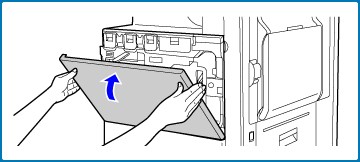
01. Open the front cover.

replace waste toner 1

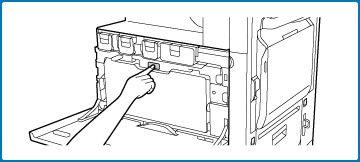
02. Press the waste toner box release button. (green)

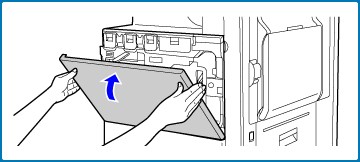
The waste toner box will fall forward as shown at left. Wait until the box comes to a stop.
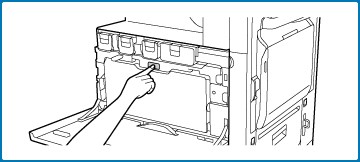
replace waste toner 2

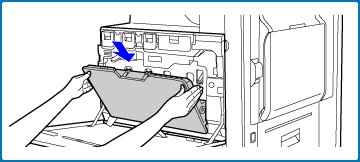
03. Remove the waste toner box.

Hold the waste toner box by both hands and lift it up slowly.
replace waste toner 3

Place the waste toner box on a flat surface. Place a sheet of paper such as newspaper on the surface before placing the waste toner box. Do not point the holes down as used toner will spill out.

04. Remove the seals around the holes.

Grasp the edge of each seal and pull it out toward you. There are 4 seals. Remove all of the seals. Plug the holes. Grasp the edge of each black seal and insert it into a hole in the box to plug the hole.
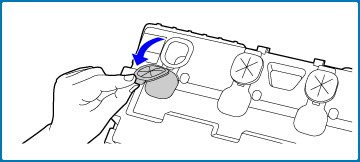
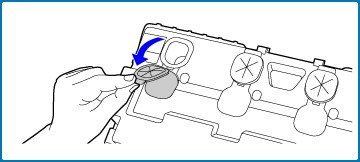
replace waste toner 4

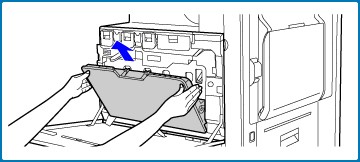
05. Install a new waste toner box.

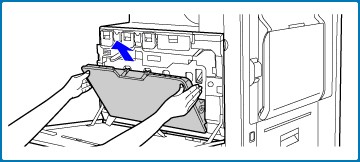
Insert the box from above at a slant. (In the direction opposite to the direction you removed it in.)

Push the waste toner box into the machine. Push the box in until it clicks into place.
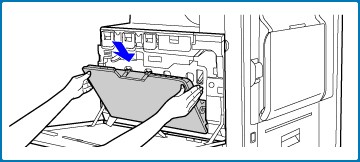
replace waste toner 5

Close the front cover.

Back to Blog

Customer Success Stories

Practical solutions. Real people. Proven results.

An Axia Office representative consulting with an elderly woman at a Sydney aged care facility.

Leading Sydney aged care facility group saves tens of thousands of dollars with free Print Health Check & Unlimited Print Plan

Pharmacist in Sydney receiving tailored documentation for a cost-effective Managed Print Plan.

Pharmacy in Sydney receives specifically tailored & cost-effective Managed Print Plan

A teacher and child playing with blocks at a Sydney childcare centre supported by the Unlimited Print Plan.

How Axia’s Unlimited Print Plan helped top childcare centres in Sydney avoid unexpected print costs

A healthcare professional in a Sydney medical practice discussing efficiency gains from a Managed Print Plan.

Improved efficiency and cost savings with a Managed Print Plan for medical practice in Sydney

Renting or Lease a Printer

Axia offers cost- effective photocopier lease options, multiple leading brands, preventative maintenance & a variety of flexible finance options to suit any business.

Managed Print

A Managed Print Plan offers a fixed cost per mono and colour page that covers equipment, service, and usage across all devices.

Unlimited Print

Our Unlimited Print Plan giving unlimited colour and black & white printing, scanning, and copying for one simple flat monthly fee.

Clock icon representing a 4-hour fast breakdown repair guarantee.

3.2 Hours

Breakdowns Fixed Fast

No Offshore Call Centres: Sydney Staff

Heart in hand icon symbolizing over $200,000 in charitable donations.

$200K+

To Charities Since 2020

RSPCA NSW, Foodbank + Others

Smiling face icon representing thousands of happy business partnerships.

1,000's+

Happy Business Partnerships

Over 90% Customer Retention

Map of Australia icon indicating the company has been Australian owned and operated since 1996.

1996

Australian Owned & Operated

Family Operated Since 1996