
Load Paper / Paper Empty Print Error

September 10, 20251 min read

ISSUE

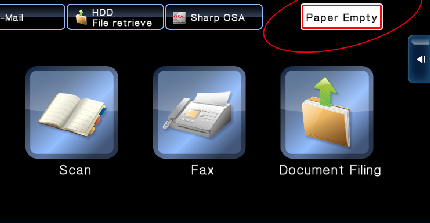
Nothing is printing, display on the photocopier is requesting paper be loaded even though you have paper in the machine.
printer properties

REASON

A job that was sent to the printer is requesting a different size paper than what is currently programmed in the copier. This causes the print queue to back up.


RESOLUTION 1: Force Print

(May not be suitable for all documents, but suitable for most.)


01. Press [OK] on the load paper/paper empty message
02. Press the job on the list with the status of "PAPER EMPTY"
03. Press [Reset (or reselect) paper]
04. Select the tray/paper you wish to print from
05. Press [OK]


RESOLUTION 2: Fix Settings on Computer

First you must delete the faulty job from the copier job list. The job causing the issue will have the status "PAPER EMPTY", select the job and press [Delete]

With your document open, you need to go to print and then access your printing preferences/printer properties, which looks something like - printer properties
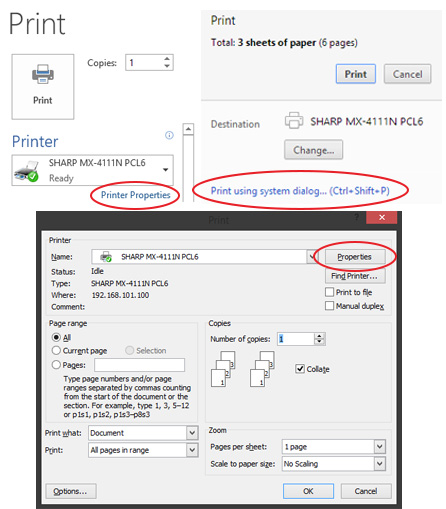
print properties

Once open, click the PAPER tab and make sure the 3 settings match below
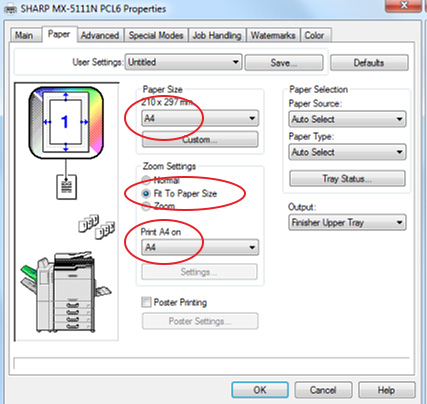
paper size

Press [OK] and [Print]

Back to Blog

Customer Success Stories

Practical solutions. Real people. Proven results.

An Axia Office representative consulting with an elderly woman at a Sydney aged care facility.

Leading Sydney aged care facility group saves tens of thousands of dollars with free Print Health Check & Unlimited Print Plan

Pharmacist in Sydney receiving tailored documentation for a cost-effective Managed Print Plan.

Pharmacy in Sydney receives specifically tailored & cost-effective Managed Print Plan

A teacher and child playing with blocks at a Sydney childcare centre supported by the Unlimited Print Plan.

How Axia’s Unlimited Print Plan helped top childcare centres in Sydney avoid unexpected print costs

A healthcare professional in a Sydney medical practice discussing efficiency gains from a Managed Print Plan.

Improved efficiency and cost savings with a Managed Print Plan for medical practice in Sydney

Renting or Lease a Printer

Axia offers cost- effective photocopier lease options, multiple leading brands, preventative maintenance & a variety of flexible finance options to suit any business.

Managed Print

A Managed Print Plan offers a fixed cost per mono and colour page that covers equipment, service, and usage across all devices.

Unlimited Print

Our Unlimited Print Plan giving unlimited colour and black & white printing, scanning, and copying for one simple flat monthly fee.

Clock icon representing a 4-hour fast breakdown repair guarantee.

3.2 Hours

Breakdowns Fixed Fast

No Offshore Call Centres: Sydney Staff

Heart in hand icon symbolizing over $200,000 in charitable donations.

$200K+

To Charities Since 2020

RSPCA NSW, Foodbank + Others

Smiling face icon representing thousands of happy business partnerships.

1,000's+

Happy Business Partnerships

Over 90% Customer Retention

Map of Australia icon indicating the company has been Australian owned and operated since 1996.

1996

Australian Owned & Operated

Family Operated Since 1996